
Building the PekNet Network with VMWare ESXi and MikroTik RouterOS#
PekNet Lab
Phase: 1 - PekNet Networking
Part 1 - VMWare ESXi Networking and RouterOS
VMWare ESXi Network Configuration#
VMWare Settings#
I have reset my VMWare ESXi instance to be the default setup without any settings changed. vSwitch0 is the default virtual switch used in ESXi and will serve to connect the lab to the home environment network. An additional virtual switch is needed to provide an isolated environment. vSwitch - PekNet is created without any physical uplink. The MikroTik RouterOS connects the two environments by controlling routes and network traffic. So far, vSwitch - PekNet has no additional machines connected besides the RouterOS VM.
VMWare also allows the user to create port groups to provide logical network configurations on top of the virtual switches. This allows for VMs to connect to the groups rather than physical network adapters. The first port group is PEK-WAN. This group has a VLAN ID of 0 as it is only for connecting to the internet by using my home network. RouterOS will connect to this port group as the WAN port. The second port group is called PEK-TRUNK and provides connection between the router and internal PekNet networks. The LAN environment requires multiple VLANs to travel and has been assigned the VLAN ID 4095. VMWare uses 4095 to enable guest tagging behavior which allows VLAN-tagged frames to pass through.
Here is a review of the different components in our network configuration at this stage.
| Component | Purpose |
|---|---|
| vSwitch0 | Existing physical home network connectivity |
| PEK-WAN | Router WAN connection |
| vSwitch-PEKNET | Isolated internal virtual network |
| PEK-TRUNK | Tagged VLAN connectivity |
| PEK-RTR01 | Router connecting the networks |
Deploying MikroTik RouterOS CHR#
Now that VMWare ESXi is setup, RouterOS can be deployed. I decided to use the CHR version of MikroTik’s RouterOS as it operates as a virtual machine and uses virtual network adapters.
RouterOS will be responsible for several important functions:
- Routing traffic between VLANs
- Providing the default gateway for each subnet
- Translating private addresses through NAT
- Enforcing firewall policies
- Supporting DNS forwarding.
- Supporting DHCP when needed (We will use a dedicated DHCP server in the future)
PEK-RTR01 Virtual Machine Setup#
After downloading the vmdk file from MikroTik’s website, we are able to create the virtual machine ESXi. RouterOS does not require significant resources which will allow us to use up minimal resources for this machine. These are the settings selected in the setup of the VM.
| Resource | Allocation |
|---|---|
| CPU | 2 vCPU |
| Memory | 1 GB |
| Network adapters | 2 |
| Adapter type | VMXNET3 |
The first adapter connects to PEK-WAN, providing access to the internet through the home network.
The second adapter connects to PEK-TRUNK to provide access to all internal PekNet VLANs.
First, the network interfaces were configured so that they have easy to understand names
The next steps are to configure WAN connectivity. My home network uses the 192.168.1.0/24 subnet, with the gateway on 192.168.1.254. RouterOS has been assigned 192.168.1.158/24 on it’s WAN interface. Connectivity to both the home default gateway and external internet was confirmed by pinging each.
After confirming connectivity, I created and implemented the VLANs. Virtual Local Area Networks (VLANs) allow for physical or virtual switching environments to be divided into multiple logical networks. Without them, devices connected on the same network can receive any traffic. Each VLAN can be assigned its own IP subnet and default gateway. For PekNet, I have decided to go with 6 different VLANs. Please see the lab introduction for what devices will be on which VLAN.
| VLAN | Name | Subnet | Gateway |
|---|---|---|---|
| 10 | Management | 10.10.10.0/24 | 10.10.10.1 |
| 20 | Servers | 10.10.20.0/24 | 10.10.20.1 |
| 30 | Clients | 10.10.30.0/24 | 10.10.30.1 |
| 40 | Security | 10.10.40.0/24 | 10.10.40.1 |
| 50 | DMZ | 10.10.50.0/24 | 10.10.50.1 |
| 60 | vMotion | 10.10.60.0/24 | 10.10.60.1 |
For creating the VLAN interfaces in RouterOS, I used the following commands
/interface vlan
add name=VLAN10-MANAGEMENT vlan-id=10 interface=ether2-TRUNK
add name=VLAN20-SERVERS vlan-id=20 interface=ether2-TRUNK
add name=VLAN30-CLIENTS vlan-id=30 interface=ether2-TRUNK
add name=VLAN40-SECURITY vlan-id=40 interface=ether2-TRUNK
add name=VLAN50-DMZ vlan-id=50 interface=ether2-TRUNK
add name=VLAN60-VMOTION vlan-id=60 interface=ether2-TRUNK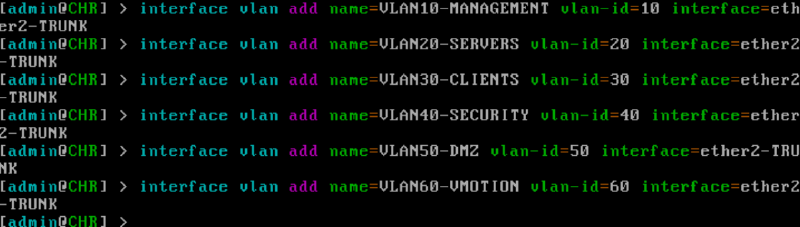
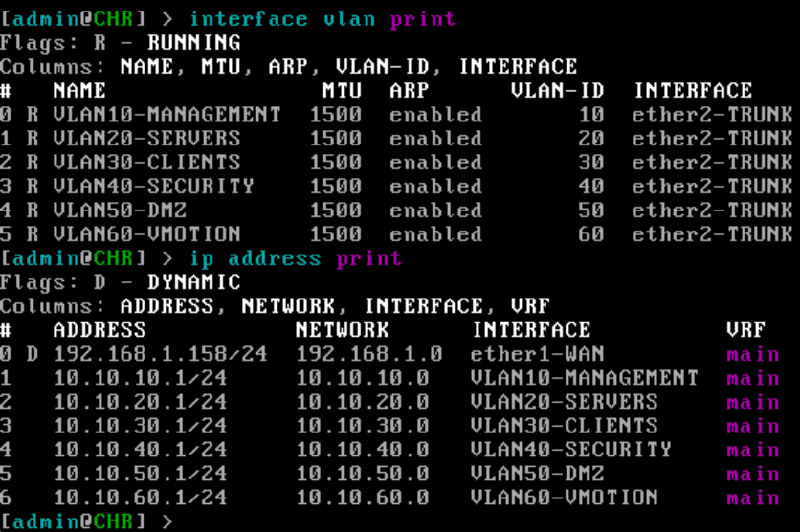
Now than the VLAN interfaces have been created, IP addresses need to be assigned to each interface. These serve as the default gateway for the devices connected to each VLAN.
/ip address
add address=10.10.10.1/24 interface=VLAN10-MANAGEMENT
add address=10.10.20.1/24 interface=VLAN20-SERVERS
add address=10.10.30.1/24 interface=VLAN30-CLIENTS
add address=10.10.40.1/24 interface=VLAN40-SECURITY
add address=10.10.50.1/24 interface=VLAN50-DMZ
add address=10.10.60.1/24 interface=VLAN60-VMOTION
RouterOS automatically installs connected routes for the corresponding networks. Creating interfaces and gateway addresses does not by itself verify that VLAN traffic is successfully passing through the switch.

Here we can see both tables for VLANs and IP Addresses
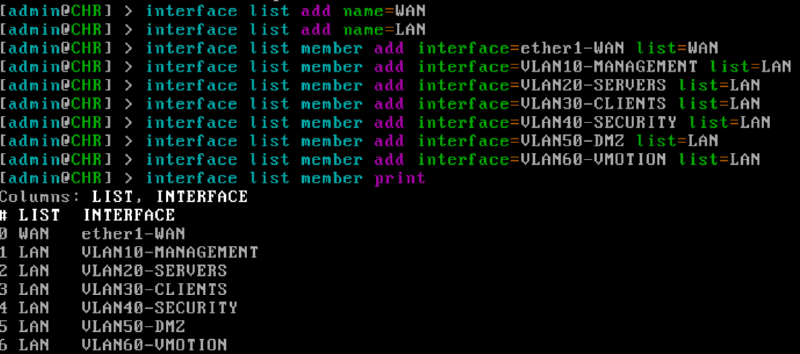
A WAN and LAN interface list was created to better help identify interfaces.
Next, I added firewall rules to protect the RouterOS VM itself using these commands:
/ip firewall filter
add chain=input action=accept connection-state=established,related,untracked comment="Allow established connections"
add chain=input action=drop connection-state=invalid comment="Drop invalid connections"
add chain=input action=accept protocol=icmp in-interface-list=LAN comment="Allow LAN ping"
add chain=input action=accept in-interface=VLAN10-MANAGEMENT comment="Allow management VLAN access"
add chain=input action=drop in-interface-list=WAN comment="Block unsolicited WAN access"
add chain=input action=drop comment="Drop all other router traffic"
Each rule serves it’s own purpose: Allow established connections: Permits traffic belonging to established connections Drop invalid connections: Discards packets that RouterOS identifies as invalid Allow LAN ping: Allows devices connected to the LAN interfaces to ping the router Allow Management VLAN access: Allows traffic originating from Management VLAN to reach router itself for administrative access Block unsolicited WAN access: Prevents unsolicited traffic arriving from home network or other network from reaching the router itself through it’s WAN interface Drop all other router traffic: Any traffic fthat does not match one of the preceding rules is dropped
A forward chain was also created to control traffic moving between networks. I wanted to allow internal VLANs to access the internet while preventing connections from the WAN side.
/ip firewall filter
add chain=forward action=accept connection-state=established,related,untracked comment="Allow established forwarding"
add chain=forward action=drop connection-state=invalid comment="Drop invalid forwarding"
add chain=forward action=accept in-interface-list=LAN out-interface-list=WAN comment="Allow PekNet internet access"
add chain=forward action=drop connection-state=new in-interface-list=WAN connection-nat-state=!dstnat comment="Block unsolicited WAN forwarding"
add chain=forward action=drop comment="Block other forwarded traffic"
Like the input rules, these forwarding rules also have specific purposes:
Allow established forwarding: Allows return traffic for established connections
Drop invalid connections: Drop invalid packets before reaching remaining rules
Allow PekNet internet access: Allows traffic originating from any LAN interface to leave through the WAN interface
Block unsolicited WAN forward: Blocks new connections arriving from WAN interface unless associated with NAT
Drop all other forwarded traffic: Blocks forwarded traffic that did not match any earlier rule
Here is a summary of the initial security policy
| Traffic | Initial behavior |
|---|---|
| PekNet VLANs to the internet | Allowed |
| Established and related connections | Allowed |
| Management VLAN to RouterOS | Allowed |
| LAN devices pinging RouterOS | Allowed |
| WAN devices accessing RouterOS | Blocked |
| Unsolicited WAN traffic forwarded inward | Blocked |
| New connections between VLANs | Blocked |
| Other unapproved router or forwarded traffic | Blocked |
Phase 1 Conclusion#
Here is a summary of what was accomplished in Phase 1
PEK-RTR01deployed.- VLAN interfaces and gateway addresses configured
- NAT configured
- Firewall policies implemented
- Connectivity valided
Phase 2 will be implementing the vSphere Environment.